
VTOL UAV Simulator Recommendations for Realistic Flight Training
2026-08-25
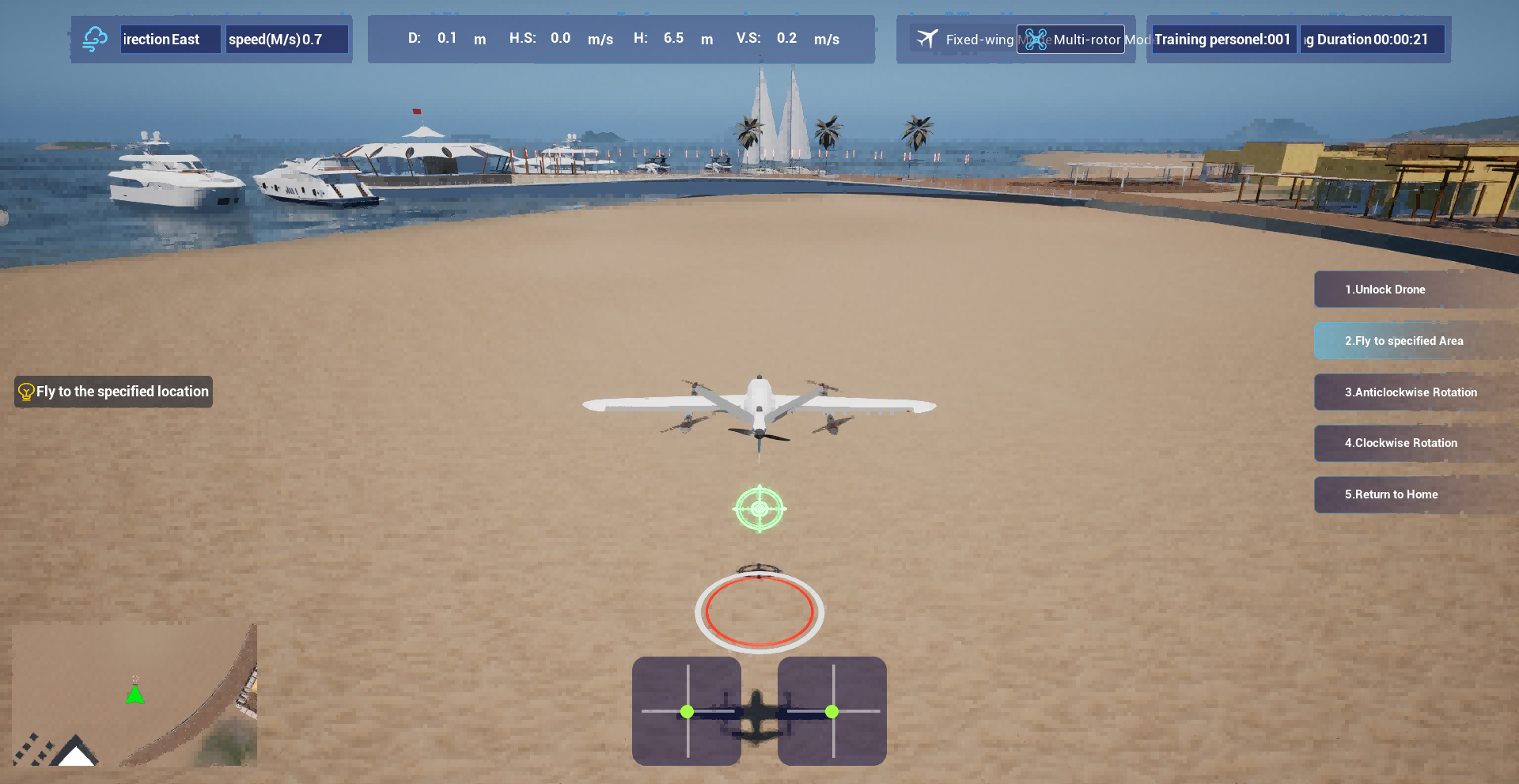
Mastering VTOL UAV flight demands more than just theory—it requires muscle memory that only realistic simulation can build. But with so many simulators flooding the market, how do you choose one that actually prepares you for real-world vertical takeoff and landing? That’s where this guide steps in. We’ve tested and compared the top options, including standout platforms like SRIZFLY, to help you train smarter, not harder.
VTOL Physics That Punish Sloppy Hovering
In a VTOL, hovering is not a neutral state—it's a constant negotiation with physics. Unlike fixed-wing flight, where lift comes from forward motion and stability often builds itself into the airframe, a hovering VTOL sits on a column of thrust with no inherent self-righting tendency. Every slight shift in center of gravity, every gust, even the pilot's own breathing translated through the controls, demands an immediate and precise correction. The machine does not forgive laziness; a half-second of inattention can turn a stable hover into a lurching, oscillating mess.
Fuel or battery consumption amplifies the punishment. In forward flight, wings carry the load and the engines can throttle back to efficient cruise settings. But in the hover, the propulsion system must produce 100% of the aircraft's weight in vertical thrust, and any inefficiency bleeds directly into flight time. Sloppy hovering means constantly overcorrecting, which spikes power draw, heats the motors, and drains the batteries far faster than the flight manual's nominal hover endurance would suggest. A pilot who hovers with sloppy stick inputs isn't just fighting the air—they're actively wasting the very energy keeping them aloft.
Then there's ground effect and its disappearing act. Close to the ground, a VTOL enjoys a cushion of high-pressure air that reduces the power needed to hover. But rise above that cushion—often just a rotor diameter or two—and the machine suddenly demands more thrust with no visual cue to warn the pilot. A sloppy hover that drifts upward without deliberate throttle management will hit this invisible ceiling and begin to sink or wobble unpredictably. The physics doesn't care about your comfort; it only responds to input precision, and hovering sloppily turns a forgiving cushion into a trap of unexpected sink rates and power shortages.
Wind and Turbulence Models With Regional Character
Coastal wind profiles rarely behave like the idealized power-law curves found in older engineering guides. In places like the North Sea or the Gulf of Mexico, marine boundary layers stay shallower and more stable, which shifts turbulence intensity toward lower frequencies and makes gust factors less predictable from standard surface roughness alone. Models tuned for open farmland tend to overshoot lateral spread near shorelines, so regional corrections often enter through the Monin-Obukhov length rather than simple roughness length adjustments.
Mountains and valleys add another layer of distortion. Katabatic flows, gap winds, and thermally driven slope circulations create turbulence spectra that are anything but homogeneous. A model calibrated for flat terrain will miss the intermittent high-energy eddies that form behind ridgelines or in narrow passes. Here, terrain-following coordinates and subgrid topographic drag terms matter more than the choice of a generic boundary-layer scheme.
Urban canopies and forested areas also demand their own regional fingerprints. Dense building arrays produce wake turbulence that decays faster with height but remains intense near roof level, while boreal forests generate elevated shear layers near the canopy top. Rather than forcing a single universal model, practitioners increasingly blend local tower data with mesoscale reanalysis to nudge turbulence closure constants toward values that reflect the dominant land cover and synoptic weather patterns of the region.
Payload and CG Shift Drills for VTOL Transition
Pilots often overlook how a rearward shift in center of gravity changes the control forces needed during the hover-to-forward-flight transition. With a heavy payload mounted far aft, the aircraft wants to pitch up sharply as airspeed builds. This drill forces you to feel that before it happens in the real thing. Start by loading a representative weight block in the aft cargo bay and noting the trim change from a clean configuration. The difference in stick position at 40 knots is far more than most expect.
On the simulator, run a series of transition profiles with the CG deliberately set at the forward and aft limits. Each time, pause at three key speeds—20, 45, and 70 knots—and record the pitch trim required to hold level flight. You will see that an aft CG demands almost constant nose-down pressure during the early acceleration phase. A forward CG does the opposite, making the nose drop and forcing you to hold back stick just when you need to monitor the wing tilt mechanism. Repeat these runs until the trim changes become second nature.
The advanced version of this drill adds a dynamic payload drop halfway through the transition. Simulate releasing an external sling load or dropping a cargo package at 50 knots. The abrupt CG forward shift causes a strong pitch-down moment, and if you are not ready with immediate aft stick and a throttle bump, the aircraft will sink rapidly. Practice this with both hands on the controls and the trim set slightly nose-heavy beforehand. After a dozen reps, you will learn to anticipate the shift and counter it without looking at the trim indicator. That reaction time is exactly what saves you during a real VTOL transition with an unbalanced load.
Hardware-in-the-Loop Without the Headaches
Setting up a hardware-in-the-loop test rig usually means wrangling a pile of interface boards, mismatched cables, and software that assumes you already know every register map by heart. The real trick is to treat the simulator not as a stand-in for your control unit, but as a collaborator that can inject faults, drift sensor values, and emulate actuator limits before the physical prototype ever leaves the bench.
A practical workflow starts with the signals you actually need to perturb, not the full wiring harness. Pick the half-dozen analog and digital lines that define your system's edge behavior, map them to a real-time target, and leave the rest at fixed values until the first loop closes. This keeps the model lean enough to run at the same tick as the controller, which matters more than adding every possible nonlinearity on day one.
The headaches usually come from timing and model boundaries, not from a lack of fidelity. Run the loop with a deliberately simple plant first, confirm that the controller sees consistent sample rates and message IDs, then layer in the difficult dynamics. When a mismatch shows up, compare the timestamped signals side by side instead of guessing which block is at fault—most integration bugs hide in the interface layer, not the physics.
Emergency Scenario Depth for VTOL Pilots
Mastering VTOL emergencies goes far beyond running a checklist. The real depth shows up during transition phases, where lift shifts between rotors and wings and the aircraft sits in a messy aerodynamic gray zone. A sudden gust or a battery cell voltage sag at that moment can feel completely different from the same failure in stable hover or cruise. Pilots who train with realistic energy management scenarios learn to read the airframe's subtle protests before warning tones even fire.
Some of the most instructive cases involve a single engine spooling down while the aircraft is low and slow over an urban landing pad, or a flight control sensor drifting just enough to make the stability augmentation fight the pilot's inputs. The scenarios that stick with you are rarely the dramatic fireballs. They are the ones where everything looks normal on the display for a few critical seconds, and the only clue is a faint vibration through the seat or a slight lag in yaw response. Building depth means practicing those ambiguous, low-information failures until the corrective action becomes muscle memory.
Effective emergency training also layers in compounding problems and time pressure. For example, a nav system reboot during a brownout landing attempt might force the pilot to hold a hover with partial instrument loss while managing a shifting wind from nearby buildings. After-action debriefs in these scenarios focus less on correct switch sequences and more on decision thresholds: when to commit to a landing, when to climb away, and when to accept that the safest option is putting the aircraft down in an unplanned spot. That kind of judgment only comes from repeatedly flying scenarios that are messy enough to feel uncomfortably close to real operations.
Debrief Metrics That Actually Improve Muscle Memory
Most debriefs stop at "that felt smooth" or "I rushed the transition," but muscle memory doesn't respond to adjectives. It responds to deltas. Record peak joint velocity on every rep, not just the best one. Track the symmetry index between left and right force plates, or the standard deviation of your contact time. When you compare those numbers across a session, the weak link stops being a feeling and becomes a repeatable fault with a threshold.
A metric that actually drives retention is the drift window: the time between your last clean rep and the first sloppy one. If that window shrinks from 12 minutes to 4 minutes over two weeks, you're not building endurance, you're masking fatigue with adrenaline. Another underused number is error distance, measured in millimeters or degrees from the intended path. Muscle memory consolidates around the edge of your control, so plotting error distance against rep count shows whether you're expanding that edge or just replaying your comfort zone.
Use these numbers in debrief by marking the rep closest to failure but still recoverable. Draw a line through the session at that point. Everything after it is rehearsal, not learning. Then adjust one variable—tempo, load, visual focus—and watch whether the drift window moves. When the metric stops changing, you've hit a plateau that no amount of extra reps will fix. That's when you change the drill, not the effort level.
FAQ
Start with RealFlight Evolution and grab a few VTOL models from the community swap pages. The physics are forgiving enough to learn transitions without spinning out, but you still get a feel for throttle management. Pair it with a basic USB controller and you'll be hovering in under an hour.
Physics wins every time for VTOL work. The tricky part is the transition between hover and forward flight, and a sim that gets induced drag or propeller wash wrong will teach you bad muscle memory. X-Plane 12 has a solid flight model, but its default VTOL UAV lineup is thin. AirSim with PX4 SITL offers real firmware dynamics, though you'll spend more time configuring than flying.
They can be, if you're comfortable with a Linux terminal. ArduPilot SITL combined with Gazebo or AirSim lets you run the actual autopilot code in the loop, which no commercial sim fully replicates. The downside is that building a good VTOL airframe model and tuning the environment takes days, not hours. If you're training for custom drones, it's worth it; for basic stick time, stick with an off-the-shelf option.
Use a proper RC transmitter like a FrSky Taranis or Radiomaster TX16S over USB. The gimbal resolution and switch placement matter more than any graphics card. Add a head tracker or VR later if you want immersion, but first get the throttle curve and mode switch feel right. A second monitor for the map or telemetry is also handy for long transition practices.
Yes, but not all sims are equal here. X-Plane lets you set custom failures per engine, which is great for asymmetric thrust training. ArduPilot SITL allows injecting faults in software, useful for testing control logic. RealFlight handles fixed-wing failures well but its VTOL failure simulation is more limited. Check the failure menu before buying if this is a priority.
Aerofly RC 10 is a good middle ground. It runs smoothly on modest hardware and the aerodynamic model holds up during slow hover to forward flight transitions. The built-in VTOL selection is small, but you can import custom models. For more community support and a larger model library, RealFlight Evolution with VTOL add-ons costs slightly more but gives you more variety.
Try a slow transition from hover to forward flight and watch the altitude and pitch. In a real VTOL, you usually need a slight pitch-up or extra throttle to avoid sinking as the wings take over. If the sim lets you slide through with no altitude dip and rock-steady attitude, the physics are probably simplified. Also check if it simulates propeller wash over the wing, because that changes lift during the transition.
The biggest one is buying based on screenshots alone. Some sims have photoreal scenery but a fixed-wing flight model stretched to VTOL, which leads to unrealistic hover stability. Another is ignoring the ability to connect to real flight controllers like PX4 or ArduPilot, which matters if you fly custom builds. Also, don't overlook wind and turbulence settings; real VTOL training should include gusty conditions, and some sims barely model them.
Conclusion
A simulator earns its keep when it punishes the same mistakes you'd make on the flight line. Look for a VTOL model that doesn't let you get away with lazy stick inputs in hover — ground effect should feel sticky, and a poorly damped descent ought to end in a wobble or a bounced landing. Wind isn't just a slider, either. The better packages build turbulence profiles from actual terrain: rolling gusts over ridgelines, thermal bubbles off asphalt, sudden crosswind funnels between hangars. Those regional quirks matter more than a uniform max-gust number because they force you to read the air instead of just fighting a constant vector.
Payload and center-of-gravity drills separate a toy from a training tool. You want the option to shift a slung load or drain fuel from one tank, then feel the transition phase become sloppier until you correct with trim and anticipation. Hardware-in-the-loop should be plug-and-play enough that you spend an evening flying, not editing config files — if your actual flight controller and ground station talk to the sim without a custom bridge script, that's the sweet spot. Emergency work needs more than a generic engine-out. Look for cascading failures: a generator dropout that dims your nav screen, a stuck actuator during conversion, a fire warning that forces a dirty, heavy landing. After each session, the debrief screen should show stick traces, energy bleed, and hover drift over time, not just pass/fail. The most useful metric is one you can feel in your thumbs the next day.
Contact Us
Contact Person: Niles Liu
Email: [email protected]
Tel/WhatsApp: 8619945009803
Website: https://srizfly.com/